Who this is for: HubSpot agencies on a paid plan (Starter or above) with 500–10,000 contacts who need to reduce duplicate records and improve data quality without a dedicated RevOps team. If you are on the free plan or have under 200 contacts, start with the CRM Data Cleansing Guide instead.
Quick Verdict
Overall score: 8/10
✅ Best for: Agencies on a tight budget wanting a free CRM with room to grow
❌ Not ideal for: Agencies needing automated duplicate contact management without upgrading to a paid plan
| Free plan | Yes |
| Paid from | $20/seat/month (Starter) |
| Duplicate contacts tool | Paid plans only (Starter+) |
| Data quality overview | Data Hub Starter ($9/seat/month) |
| CRM integrations | HubSpot ecosystem, 1,000+ via API |
What is HubSpot CRM?
HubSpot CRM is a cloud-based customer relationship management platform that has been free at its core since 2014. For small agencies, that matters more than it sounds. You get a real CRM — contact records, deal pipelines, email integration, activity tracking — without a monthly bill until you choose to upgrade.
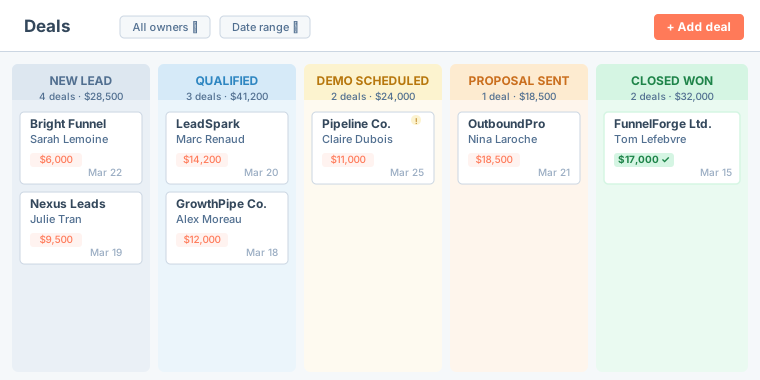
The free plan is not a trial. There is no time limit, no artificial cap on contacts, and no feature that disappears after 14 days. For a 3–10 person agency that needs a shared view of its pipeline and a place to track conversations, the free tier covers most of what you actually need day to day.
Where HubSpot differs from lighter tools like Pipedrive or Close is that it sits inside a broader platform. The CRM connects to HubSpot's Marketing Hub, Sales Hub, and Service Hub. That matters if your agency wants email sequences, landing pages, or a help desk under one roof later. For now, though, you can ignore all of that and use the CRM as a standalone tool.
One area where plan tier makes a real difference: HubSpot duplicate contacts and data quality. HubSpot's free plan has no automated duplicate detection, no bulk merge, and no data quality alerts. If your agency imports leads regularly, HubSpot duplicate contacts will accumulate silently across your pipeline. This review covers exactly what each plan gives you — and what it doesn't — so you can make an informed decision before committing.
HubSpot CRM Pricing
Pricing verified March 2026. Prices may change — check the tool's official pricing page for the latest rates.
| Plan | Price | Best for |
|---|---|---|
| Free | $0 | Agencies just getting started |
| Starter | $20/seat/month | Small teams needing basic automation |
| Professional | From $90/seat/month | Growing agencies with complex pipelines |
| Enterprise | From $150/seat/month | Large teams — overkill for most agencies |
For most 3–25 person agencies, the Free or Starter plan is enough to start.
That said, be honest about how seat-based pricing scales. A 10-person team on Starter pays $200/month. Before you upgrade, audit who genuinely needs access and who just needs occasional visibility.
Note on Data Hub pricing: The pricing above refers to HubSpot CRM (Sales Hub). HubSpot also sells Data Hub as a separate paid add-on — see the Data Hub section below for its own pricing and feature breakdown.
HubSpot CRM Data Quality & Duplicate Contacts: What Each Plan Gives You
This is the section that matters most if your agency's pipeline health is on the line. CRM data hygiene is directly tied to how well your CRM handles duplicates, stale deals, and missing information — and HubSpot has a mixed record here depending on which plan you are on.
HubSpot Duplicate Contacts: How the Native Detection Tool Works
HubSpot duplicate contacts are managed via Contacts → Actions → Manage Duplicates — a native tool that surfaces likely duplicate pairs for review and lets you merge them one at a time. This feature is only available on paid plans (Starter and above). On the free plan, there is no automated scan, no duplicate alert, and no bulk merge. You can still merge contacts manually by opening a record and using Actions → Merge, but you have to find the HubSpot duplicate contacts yourself first.
For a 10-person agency with 2,000 contacts, that is a real problem. If your team is importing leads from ads, forms, and manual entry, duplicates will accumulate. Left unchecked, your reps end up calling the same contact twice under different names, or worse, assigning the same company to two different owners. Manual deduplication at that scale takes hours, and it only fixes yesterday's mess — new duplicates keep coming in.
If HubSpot duplicate contacts are a top priority and you are on the free plan, you will need to export your contacts periodically and run a separate audit process. That is a known gap. Upgrading to Starter unlocks the Manage Duplicates tool, which is the most practical first step for most agencies. For a full walkthrough, see the HubSpot duplicate contacts guide →
HubSpot Data Hub — Paid Add-On for Advanced Data Quality
Beyond the standard CRM, HubSpot offers Data Hub as a separate paid add-on designed for teams that want automated data quality monitoring. It is not included in your base CRM plan — it has its own pricing tiers.
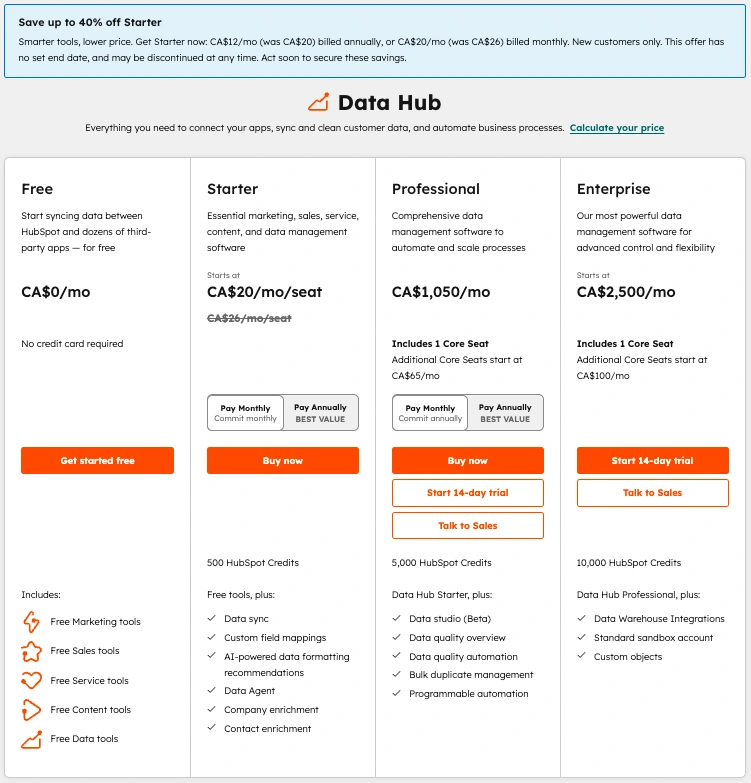
Pricing verified March 2026. Prices may change — check the tool's official pricing page for the latest rates.
| Data Hub Plan | Price (billed monthly) | Key features |
|---|---|---|
| Free | $0 | Data sync, free tools |
| Starter | From $20/seat/mo | Data sync, custom field mappings, AI-powered data formatting, data agent, company & contact enrichment |
| Professional | From $1,050/mo | Data studio (Beta), data quality overview, data quality automation, bulk duplicate management, programmable automation |
| Enterprise | From $2,500/mo | Data Warehouse integrations, standard sandbox, custom objects |
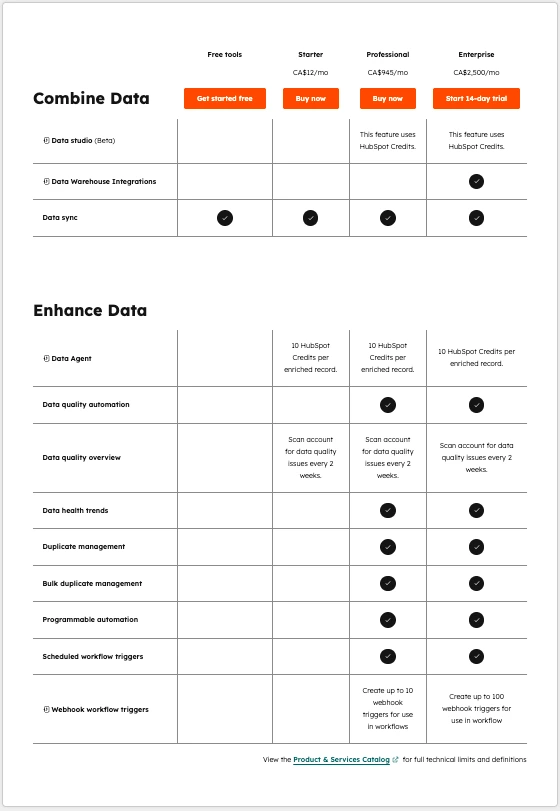
A few things worth noting from the feature breakdown:
- Data quality overview (a scan of your account for data quality issues every 2 weeks) is included from Data Hub Starter ($9/seat/month). This gives you a regular health report on your HubSpot data without manual effort.
- Duplicate management and bulk duplicate management are only available from Data Hub Professional ($720/month). If you want automated, bulk deduplication inside HubSpot itself, that is the price point you are looking at.
- Data quality automation — which lets you set rules to fix issues automatically — also requires Professional.
For most 3–25 person agencies, the jump to Data Hub Professional ($720/month) is hard to justify solely for deduplication. A dedicated third-party tool like Koalify or Insycle will solve the duplicate problem at a fraction of the cost. Data Hub Professional makes sense if you need the full suite: quality overview, automation, bulk dedup, and data health trends all under one roof.
Pipeline Hygiene Tools
HubSpot's deal pipeline is genuinely well built. You can create custom stages, set required fields for stage transitions, and log every activity — calls, emails, meetings, notes — against a deal record. That gives you a reliable audit trail and makes it much harder for a deal to move forward with incomplete information.
Task and activity tracking is strong on all plans. Every rep can see what is due, what is overdue, and what was last done on any deal. That alone reduces a lot of the "I forgot to follow up" problems that kill pipelines at small agencies.
What is missing on the free plan is a stale deal alert. There is no native notification that tells you a deal has sat in a stage untouched for 14 or 30 days. You can see it if you look — the activity log will show the last touch date — but nothing proactively surfaces it for you. Paid plans give you more reporting control here.
One practical workaround: export your open deals as a CSV once a month and review them outside the CRM. Sorting by last activity date takes about five minutes and immediately shows you what is stale. That external audit step is worth building into your team's monthly rhythm regardless of which CRM you use.
Reporting and Visibility
The free plan includes pre-built dashboards that show deal totals by stage, activity counts, and recent contact activity. For a small team that just needs a weekly snapshot of pipeline health, this is usually enough.
Custom reports — filtering by specific fields, building cross-object reports, or creating forecasts — require Starter or above. If your agency needs to report pipeline to clients or leadership with any nuance, that is the main functional reason to upgrade. The Starter plan at $20/seat unlocks most reporting you will need at this stage.
What HubSpot CRM Does Well
- Generous free tier. Most small agencies never need to pay. The free plan covers contacts, deals, pipelines, email integration, and basic reporting.
- Best-in-class contact timeline. Every email, call, meeting, and note is logged on one record. You always know the full history of a contact without digging through inboxes.
- Native Gmail and Outlook integration. Emails sync both ways. Your reps can log calls and book meetings directly from their inbox without switching apps.
- 1,000+ third-party integrations. HubSpot connects to ad platforms, form tools, billing software, and most things your agency already uses.
- Scales well as the agency grows. If you outgrow the free plan, the upgrade path is clear and the data stays in place. You are not starting over.
What HubSpot CRM Does Poorly
- HubSpot duplicate contacts management requires a paid plan. The Manage Duplicates tool is not available on the free plan — only on Starter and above. On the free plan there is no automated scan, no bulk merge, and no alert when HubSpot duplicate contacts appear. At scale, this becomes genuinely painful.
- Reporting is locked behind paid plans. Custom reports, forecast views, and cross-object reporting require Starter or above. The free dashboards are limited.
- Seat-based pricing gets expensive fast. A 10-person team on Starter costs $200/month. Upgrading to Professional or adding Data Hub raises that significantly. That is a real commitment for a small agency.
- GoHighLevel and Pipedrive are stronger for pure pipeline management. If your agency's primary need is deal tracking and pipeline visibility — not marketing automation — both alternatives have cleaner pipeline UX at a lower cost.
- Support is limited on the free plan. Free users get community forums and documentation. Live chat and phone support require paid plans. If you get stuck, you are mostly on your own.
HubSpot CRM vs Alternatives
vs Pipedrive: Pipedrive has a cleaner pipeline interface and better deal-management UX at lower price points. HubSpot wins on free tier depth and marketing integrations. If your agency does outbound-heavy work and just needs a great pipeline tool, Pipedrive is worth a look. If you want a free option that can expand into marketing, HubSpot is the better call.
vs GoHighLevel: GoHighLevel is built specifically for agencies that manage multiple clients, with white-label features and client sub-accounts. HubSpot is better for agencies using the CRM for their own business development rather than managing client pipelines. If you are running client campaigns inside your own CRM instance, GoHighLevel is designed for exactly that use case.
vs Close: Close is built for high-volume outbound calling, with a built-in power dialer and call workflow tools that HubSpot does not match on any plan. If your agency runs cold-calling sequences at volume, Close is the better fit. For inbound lead management and nurturing, HubSpot holds up well.
Is HubSpot CRM Worth It for Your Agency? (Especially for Duplicate Contacts & Data Quality)
Use this as a quick decision framework:
- If your agency is just starting out → start with the free plan and set it up properly from day one
- If duplicate contacts are already a problem → upgrade to Starter ($20/seat/month) to unlock Manage Duplicates
- If you want automated data quality monitoring → add Data Hub Starter ($9/seat/month)
- If you need bulk duplicate management and data quality automation → Data Hub Professional ($720/month)
- If you need basic email sequences and automation → upgrade to Starter ($20/seat/month)
- If you are managing 5,000+ contacts and need reporting → consider Professional
- If you need white-label client CRM with sub-accounts → look at GoHighLevel instead
The honest answer for most small B2B agencies: start on free, run it for 90 days, and upgrade only when you hit a specific wall. The most common reason to upgrade is reporting — once your team needs to show pipeline data to leadership or clients in a structured way, the free dashboards stop being enough.
Do not upgrade because the free plan feels limiting in theory. Upgrade when it is limiting in practice.
How to Get Started With HubSpot CRM
Step 1: Sign up for the free plan.
Click here to go to hubspot.com — no credit card required.
Step 2: Import your existing contacts — and deduplicate first. Export your current contacts as a CSV from wherever they live — spreadsheet, old CRM, email tool. Fix any HubSpot duplicate contacts before importing: cleaning the list before the import is much faster than cleaning it after. Once duplicates are inside HubSpot, removing them requires either a paid plan or a manual record-by-record process.
Step 3: Set up your pipeline stages. Map out the stages your deals actually go through before you create them in HubSpot. Generic defaults ("Appointment Scheduled", "Qualified to Buy") rarely match how a small agency actually sells. Name the stages to match your real process.
Step 4: Connect Gmail or Outlook. Do this before anyone on the team starts using the CRM. Once email is synced, every email your reps send from their inbox is automatically logged on the contact record. This is the feature that makes the contact timeline genuinely useful.
Step 5: Export your pipeline monthly and audit for stale leads. Build this into a recurring calendar event from the start. A monthly 30-minute review of open deals sorted by last activity date will catch the deals that are quietly dying. It is the simplest pipeline hygiene habit you can build.
Before you start, export your current CRM data as a CSV and run a quick hygiene audit — it will show you exactly what you are importing into HubSpot. How to clean your CRM data before migrating →
Frequently Asked Questions
Is HubSpot CRM free? Yes. HubSpot CRM has a genuinely free plan with no time limit, no credit card required, and no cap on the number of contacts. You get contact records, deal pipelines, email integration, activity tracking, and basic reporting at no cost. Features like the Manage Duplicates tool, custom reports, and email sequences require a paid plan starting at $20/seat/month (Starter).
Does HubSpot detect duplicate contacts automatically? Partially. The Manage Duplicates tool (Contacts → Actions → Manage Duplicates) scans for likely HubSpot duplicate contacts and surfaces them for review — but it does not auto-merge anything. Every merge requires manual confirmation. This tool is only available on paid plans (Starter and above). Free plan users have no automated duplicate scan and must find and merge contacts manually. For bulk deduplication, third-party tools like Koalify handle HubSpot duplicate contacts more efficiently.
What is the difference between HubSpot CRM and HubSpot Data Hub? HubSpot CRM (Sales Hub) is the core contact, deal, and pipeline management platform. HubSpot Data Hub is a separate paid add-on that provides automated data quality monitoring, scheduled duplicate management, bulk duplicate merging, and data quality automation. Data Hub Starter starts at $9/seat/month and adds a bi-weekly data quality scan. Data Hub Professional ($720/month) unlocks bulk duplicate management — the feature most agencies actually need for serious data quality work.
Is HubSpot CRM good for small agencies? Yes, especially for agencies starting out. The free plan covers most of what a 3–10 person agency needs day to day. The main limitations are: no automated duplicate contacts management on the free plan, no custom reports without Starter, and seat-based pricing that scales steeply for larger teams. For agencies that need pure pipeline focus without marketing features, Pipedrive is worth comparing — see the Pipedrive CRM review.
How does HubSpot compare to Pipedrive for data quality? HubSpot wins on contact-level data quality tools (Manage Duplicates on Starter+, Data Hub for advanced scans) and has more integration options for data enrichment. Pipedrive wins on deal-level hygiene — its deal rotting feature (available on all plans) proactively flags stale deals, which HubSpot Free does not do natively. For a head-to-head comparison, see the Pipedrive CRM review.
What should I do about HubSpot duplicate contacts on the free plan? Export your contacts as a CSV (Contacts → Actions → Export), sort by email column A to Z, and identify rows with matching addresses. Then merge them manually from each contact record using Actions → Merge. For a step-by-step walkthrough, see the HubSpot duplicate contacts guide. If the backlog is large (500+ duplicates), upgrading to Starter or using a free tool like Koalify will save significant time.
Ready to Try HubSpot CRM?
Start free with HubSpot →Free forever. No credit card required.
We're building a free audit tool that finds all of these issues in your pipeline in 60 seconds — just upload your CSV.