Duplicate contacts are one of the most common and most damaging problems in a small agency's CRM. They corrupt your reporting, waste rep time, and occasionally cause two people on your team to chase the same lead at the same time. For agencies on HubSpot, Pipedrive, GoHighLevel, or Close, the duplicate problem compounds with every CSV import, form submission, and manual entry — and it does not fix itself.
Who this is for: Agencies actively evaluating a dedicated CRM deduplication tool with a budget of $0–$63/month. This guide compares four options across HubSpot and Pipedrive. If you just need to understand what data hygiene is first, read What is CRM Data Hygiene?.
A good CRM cleaner does two things: it finds duplicate and stale records, and it gives you a safe way to merge or remove them without losing activity history. The good news is that the right tool can automate most of the cleanup. The bad news is that there is no single CRM cleaner that works for every platform and every budget. This roundup covers the four options most relevant to small B2B agencies, with honest assessments of what each one actually does well.
Before running any CRM cleaner or deduplication tool, following database hygiene best practices means starting with an audit — not a merge. A what is data hygiene deep-dive will tell you how many duplicates you have and where they are coming from — which helps you pick the right tool for the job.

Quick Comparison
Pricing verified March 2026. Prices may change — check the tool's official pricing page for the latest rates.
| Tool | Best For | Price (billed monthly) | Free Plan? |
|---|---|---|---|
| HubSpot Native | HubSpot users | Starter $20/seat/mo | No (Starter+) |
| Pipedrive Native | Pipedrive users | from $24/seat/mo (Lite+) | No (paid plan) |
| Koalify | HubSpot power users | Free / Pro from $20/mo | Yes (free forever) |
| Insycle | Full data ops | From $31/mo (billed monthly) | 14-day trial |
What to Look For in a CRM Cleaner and Deduplication Tool
Database hygiene best practices start before you pick a tool: know your duplicate rate, identify the sources (imports, manual entry, form fills), and decide whether you need a one-off cleanup or an ongoing automated process. The answers will determine which CRM cleaner fits.
1. Detection Accuracy
A deduplication tool is only as useful as its ability to find the actual duplicates. Basic tools match on exact email addresses only — which means a contact entered as "john@acme.com" and "John Smith at Acme" will slip through. Better tools use fuzzy matching on names, company, phone number, and email domain. Before committing to any tool, test it on a sample of your own data to see how it handles the real-world mess of your contact base.
2. Merge Control
Merging two contact records is a destructive action. You need to know which record gets kept, which fields win in a conflict, and what happens to the activity history on the record you are deleting. Some tools auto-merge without review; others give you full control field by field. For most agencies, some level of human review is worth the extra time — especially the first time you run a bulk merge.
3. Automation Level
If your database is growing every week, one-off manual deduplication is a losing battle. The best tools let you set rules once and run scheduled deduplication automatically — so new duplicates created by form fills or imports are caught before they accumulate. Fully manual tools are fine if your database is small and stable; they become a bottleneck at scale.
4. CRM Compatibility
Most deduplication tools are built for one CRM, not all of them. HubSpot-specific tools will not help your Pipedrive database, and vice versa. Before evaluating any tool, confirm it integrates with the specific CRM you are running. If your agency works across multiple CRMs — managing client pipelines in different systems — you will need either a multi-CRM tool like Insycle or a separate solution per platform.
1. HubSpot Native Deduplication — Best Free Option for HubSpot
HubSpot's built-in duplicate management lives under Contacts → Actions → Manage Duplicates. It surfaces pairs of contacts that HubSpot has identified as potential duplicates, and lets you review and merge them one at a time.
Pros:
- Included in all paid HubSpot plans (Starter and above) at no extra cost
- No setup or third-party integration required
- Merged records retain the full activity history from both contacts
Cons:
- Not available on the free plan — requires at least Starter ($15/seat/mo billed annually, $20/mo billed monthly)
- Fully manual — you review and merge one pair at a time
- No bulk merge, no scheduled scan, no automation
- Limited detection logic — misses fuzzy duplicates and contacts from different import sources
- Does not scan for duplicates automatically when a new contact is created
Best for: HubSpot agencies on a paid plan with under 500 contacts who can afford to spend 30 minutes a month on manual cleanup. Free plan users need a different approach — export and audit your contacts as a CSV instead.
Get HubSpot Free →2. Pipedrive Native Duplicate Detection — Best Free Option for Pipedrive
Pipedrive includes native Merge duplicate data on all paid plans (Lite and above). It flags potential duplicates when a contact or organisation is manually entered — surfacing a warning before the record is saved — and lets you merge them directly. This catches the most common source of duplicates for teams doing manual data entry.
What it does not do: detect duplicates created during CSV imports, run scheduled scans, or offer any bulk merge tooling. If your agency regularly imports contact lists from campaigns or lead sources, Pipedrive's native detection will miss those duplicates entirely.
Pros:
- Included in all paid Pipedrive plans at no extra cost
- Works natively inside Pipedrive — no integration required
- Catches manual entry duplicates before they are created
Cons:
- No detection on CSV imports — the most common source of duplicates for growing agencies
- No bulk merge or scheduled automation
- No auto-merge capability
Best for: Pipedrive agencies with a small, clean database and a team that primarily adds contacts manually rather than via import.
Try Pipedrive →3. Koalify — Best for HubSpot Deduplication
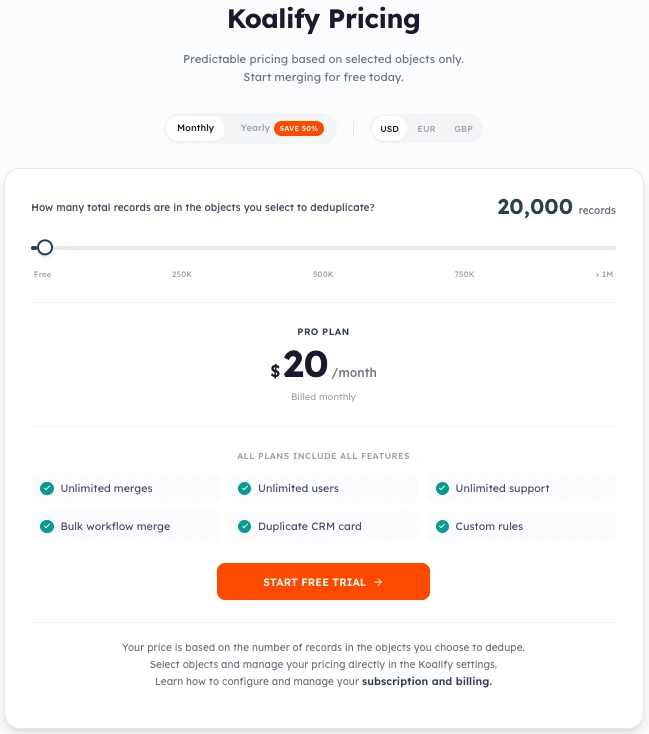
Dedicated contact deduplication tool for HubSpot. Koalify connects directly to your HubSpot account and gives you bulk merging, rules-based detection, and a dashboard for reviewing matches at scale.
It detects duplicates across contacts, companies, and deals — not just email matches — which catches duplicates that would otherwise sit undetected for months.
Pros:
- Free plan available — fully functional for HubSpot accounts under 10,000 records
- HubSpot-native, handles bulk operations, good for growing databases
- Detects duplicates across contacts, companies, and deals
- Supports bulk workflow merge and rules-based field merging
- Unlimited users and unlimited merges on all plans
- Free trial available on paid plans
Cons:
- HubSpot only — does not integrate with any other CRM
- No volume discount beyond the per-10K-records pricing model
Best for: HubSpot agencies with under 10,000 records (free) or growing databases that need bulk dedup at a predictable per-record price.
Pricing (billed monthly — save 50% by switching to annual billing):
Pricing verified March 2026. Prices may change — check the tool's official pricing page for the latest rates.
| Plan | Records | Price/month (billed monthly) | Price/month (billed annually) |
|---|---|---|---|
| Free | Up to 10,000 | $0 — free forever | $0 — free forever |
| Pro | Up to 20,000 | $20/mo | $10/mo — save 50% |
| Pro | Up to 30,000 | $30/mo | $15/mo — save 50% |
| Pro | Up to 40,000 | $40/mo | $20/mo — save 50% |
| Pro | Up to 50,000 | $50/mo | $25/mo — save 50% |
| Pro | 50,000+ | +$10/mo per 10,000 records | +$5/mo per 10,000 records |
All plans include all features: unlimited merges, unlimited users, unlimited support, bulk workflow merge, duplicate CRM card, and custom rules.
Try Koalify →4. Insycle — Best for Full Data Operations
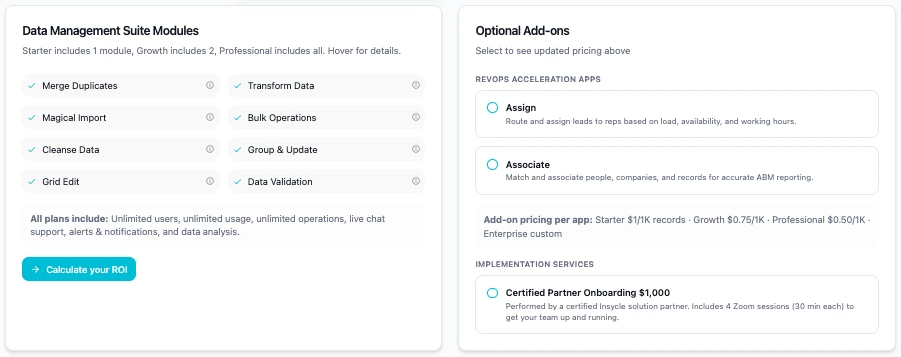
Insycle is not just a deduplication tool — it is a full CRM data management platform built around a modular Data Management Suite. Each plan gives you access to a set number of modules — Starter includes 1, Growth includes 2, Professional includes all 8. The deduplication module (Merge Duplicates) is one of the 8 available modules, so even the entry plan covers it.
If your agency has problems beyond duplicates — inconsistent naming conventions, missing fields, imported data in the wrong format — Insycle handles all of it from one place via its other modules: Cleanse Data, Bulk Operations, Transform Data, Data Validation, and more.
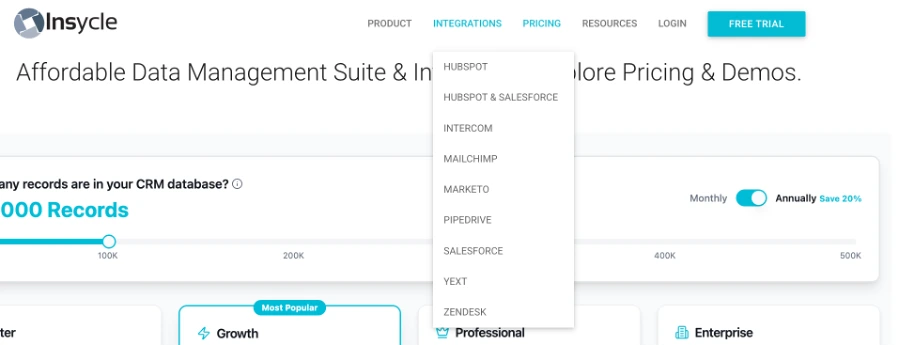
It supports HubSpot, HubSpot & Salesforce (combined), Salesforce, Pipedrive, Intercom, Mailchimp, Marketo, Yext, and Zendesk — making it one of the broadest multi-platform tools on this list.
Pros:
- Near-duplicate detection catches variations that exact-match tools miss
- Scheduled automations run deduplication on a regular cadence without manual intervention
- Full data ops: 8 modules covering deduplication, standardisation, bulk updates, import, and validation
- Broadest multi-platform support: HubSpot, Salesforce, Pipedrive, Intercom, Mailchimp, Marketo, Yext, Zendesk
- All plans include unlimited users, manual/bulk/automated operations, health assessment, audit trail, and workflow integration
- 14-day free trial on all paid plans
Cons:
- Starts at $31/month (billed monthly) — significantly more expensive than single-purpose deduplication tools
- Module-based pricing: Starter ($31/mo) only includes 1 module; you need Growth ($47/mo) for 2 or Professional ($63/mo) for all modules
- Steeper learning curve — more configuration required before it is useful
- More than most agencies need if deduplication is the only problem to solve
Best for: Agencies with a dedicated data operations budget ($31–63/month) who need more than just deduplication — standardisation, bulk formatting, import automation, and scheduled cleanup across multiple CRMs.
Pricing (billed annually):
Pricing verified March 2026. Prices may change — check the tool's official pricing page for the latest rates.

| Plan | Price/month (billed monthly) | Modules included | Best for |
|---|---|---|---|
| Starter | $31 | Any 1 module | Agencies needing one focused function |
| Growth | $47 | Any 2 modules | Teams needing dedup + one other tool |
| Professional | $63 | All modules | Full data ops across the CRM |
| Enterprise | Custom | Custom | Large teams needing dedicated support |
All plans include: unlimited users & usage, manual/bulk/automated operations, health assessment, audit trail & history, workflow integration.
Available modules: Merge Duplicates, Magical Import, Cleanse Data, Grid Edit, Transform Data, Bulk Operations, Group & Update, Data Validation.
 Try Insycle free for 14 days →
Which CRM Cleaner and Deduplication Tool Is Right for Your Agency?
Not every CRM cleaner is built the same. Some focus purely on deduplication; others cover standardisation, bulk formatting, and validation too. Use this decision framework to cut through the options:
- HubSpot + under 500 contacts + paid plan → HubSpot native (included, no setup)
- HubSpot + free plan → export contacts as CSV and audit manually
- HubSpot + 1,000+ contacts → try Koalify (bulk merge, better detection)
- HubSpot or Pipedrive + need dedup + standardisation + automation + budget $31+/mo → Insycle (full data ops, 8 modules, broadest CRM support)
- Pipedrive + small clean database → Pipedrive native (built in, no cost)
- GoHighLevel or Close → Check native settings first; most third-party tools do not support these CRMs
If your agency is mid-migration between CRMs, deduplicate your existing data before the move. Importing a dirty contact list into a new system resets nothing — it just moves the problem. The CRM Data Cleansing Guide walks through how to clean a contact export before importing.
The Bottom Line
Start with the native CRM cleaner built into whatever platform you are already using. For most small agencies with under 500 contacts, the native tool is genuinely enough — especially if your team is disciplined about how it adds contacts. Free and built in beats a paid integration you have to maintain.
Upgrade when manual merging starts taking meaningful time. A rough threshold: if your team is spending more than two hours per month on manual duplicate review and cleanup, a dedicated CRM cleaner pays for itself quickly. Koalify (from free) will handle deduplication for HubSpot agencies. Insycle (from $31/month) is the right call when you also need data standardisation, bulk formatting, or multi-CRM support — it is the most complete CRM cleaner and deduplication tool on this list.
Prevention matters more than cure. The most effective long-term strategy is not a better CRM cleaner — it is fixing the sources of duplicates at the point of entry. That means cleaning CSV files before import, setting validation rules on forms, and training your team to search before adding. A good deduplication tool handles the backlog; it does not stop new duplicates from arriving.
Before choosing a tool, run a quick audit of your current pipeline to see how bad the duplicate problem actually is.
Frequently Asked Questions
What is the best CRM cleaner for small agencies? For HubSpot agencies with under 10,000 records, Koalify is the best CRM cleaner — it is free, handles bulk merges, and detects duplicates across contacts, companies, and deals. For agencies needing multi-CRM support or full data operations (standardisation, bulk formatting, validation), Insycle (from $31/month) is the most complete option. For Pipedrive users with small, stable databases, the native duplicate detection is usually enough.
What is the best CRM deduplication software in 2026? It depends on your CRM and budget. For HubSpot: Koalify (free to $20/mo) for deduplication, Insycle ($31–63/month) for full data ops. For Pipedrive: native merge on all plans, Insycle for bulk work. For multi-CRM agencies: Insycle is the only tool on this list that covers HubSpot, Salesforce, Pipedrive, Intercom, and Mailchimp from one platform.
Is there a free CRM cleaner? Yes. Koalify has a free plan covering up to 10,000 HubSpot records with unlimited merges and full feature access. HubSpot and Pipedrive both include native duplicate detection tools at no extra cost on paid CRM plans. For basic deduplication without any paid tool, export your contacts as a CSV, sort by email, and merge duplicates manually — the CRM data cleansing guide walks through the full process.
What is the difference between a CRM cleaner and deduplication software? Deduplication software focuses specifically on finding and merging duplicate records. A CRM cleaner is broader — it may also handle data standardisation (fixing inconsistent company names, phone formats), bulk field updates, stale record archiving, and data validation rules. Koalify is primarily a deduplication tool. Insycle is a full CRM cleaner covering all of these functions.
Which CRM deduplication tool works with Pipedrive? Insycle is the only third-party tool on this list that supports Pipedrive alongside HubSpot. Koalify is HubSpot-only. Pipedrive's native merge tool covers basic deduplication on all plans. For bulk Pipedrive deduplication, Insycle (from $31/month) is the practical answer — see the Pipedrive CRM review for more on what Pipedrive's native tool covers.
How do I know if I need a CRM cleaner? If your team spends more than two hours per month on manual duplicate review and merging, a dedicated CRM cleaner pays for itself quickly. Other signs: your duplicate count is growing faster than you can clear it, you are importing contact lists regularly, or your pipeline report includes records you can no longer trust. Run a quick audit first — export your contacts as a CSV and sort by email to get an honest count of your current duplicate rate.
Ready to Clean Up Your CRM?
Want to know your exact duplicate rate before buying a tool?
We're building a free CSV audit tool that shows your duplicate rate, stale lead count, and overall hygiene score — 60 seconds, no integrations.