Who this is for: Pipedrive agencies on any paid plan who add contacts primarily through manual entry or CSV import and want to catch duplicates before they accumulate. If you need bulk deduplication across thousands of records, see the CRM Cleaner & Deduplication Software guide.
Quick Verdict
Overall score: 8.5/10
✅ Best for: Agencies that want a focused, visual pipeline CRM without the complexity of HubSpot
❌ Not ideal for: Agencies needing a free CRM or required fields without paying for Premium
| Free plan | No |
| Paid from | $24/seat/month (Lite, billed monthly) |
| CRM integrations | 500+ via marketplace, Zapier, API |
What is Pipedrive CRM?
Pipedrive is a sales CRM built around one idea: every deal needs a next action, and nothing should fall through the cracks. Where most CRMs treat the pipeline as one feature among many, Pipedrive treats it as the entire product. Your deals live on a visual kanban board, you drag them between stages, and the system constantly nudges you to schedule the next activity.
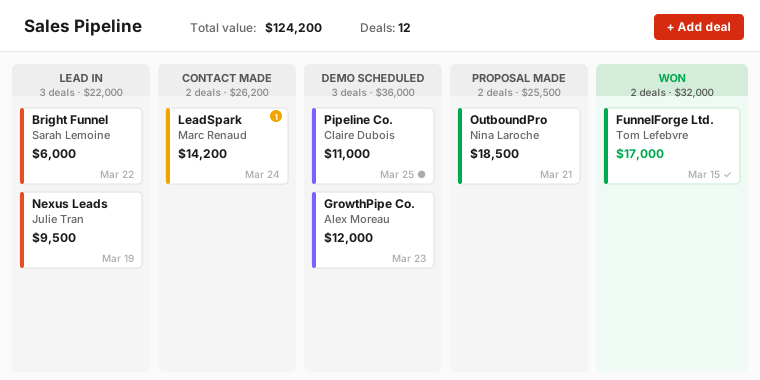
That pipeline-first approach makes it noticeably different from HubSpot. HubSpot is built for teams that want a CRM and a marketing platform under one roof. Pipedrive is built for salespeople who want to move deals forward and do not need a landing page builder or email marketing suite to do it. That distinction matters if your agency is tired of paying for features it never opens.
For small B2B lead-gen agencies running paid ads and managing inbound leads, Pipedrive hits a practical sweet spot. It is opinionated enough to enforce good habits — activity reminders, pipeline stage discipline, deal rotting alerts — without the overhead of learning a platform that was built for enterprise marketing teams.
Pipedrive CRM Pricing
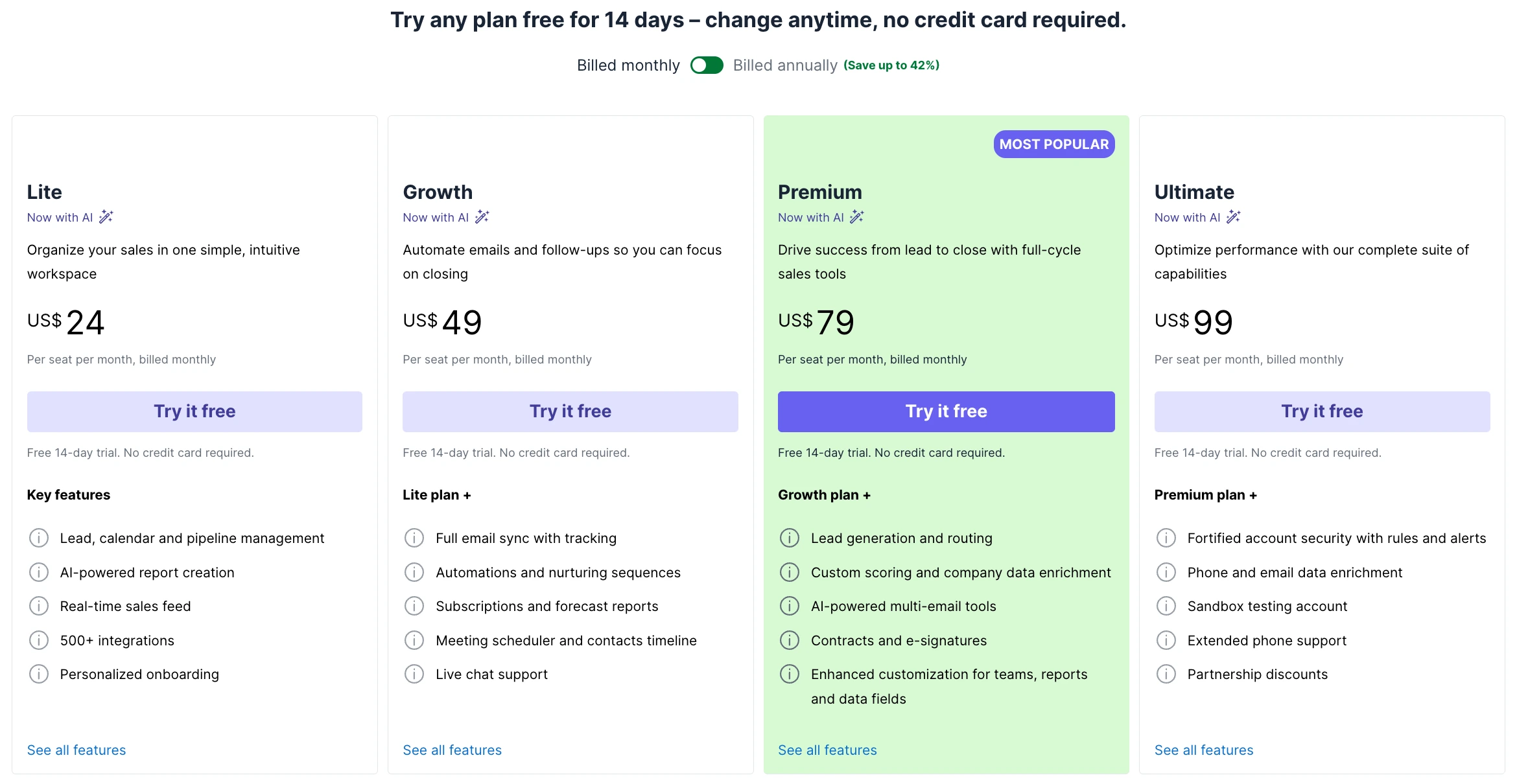
Pricing verified March 2026. Prices may change — check the tool's official pricing page for the latest rates.
| Plan | Price (billed monthly) | Best for |
|---|---|---|
| Lite | $24/seat/month | Small agencies getting started |
| Growth | $49/seat/month | Teams needing email sync and automations |
| Premium | $79/seat/month | Growing agencies with reporting and required fields |
| Ultimate | $99/seat/month | Full customisation and advanced security |
Pipedrive offers up to 42% discount when billed annually. The monthly prices above are for month-to-month billing — annual billing brings Lite down to approximately $14/seat/month.
All plans come with a free 14-day trial, no credit card required.
The honest limitation here: there is no free plan. Every seat costs money from day one, which is a real barrier if your agency is bootstrapped or just getting its sales process off the ground. If that is your situation, HubSpot Free is worth trying first.
For most 3–25 person agencies, Lite or Growth is enough to start. Lite covers the visual pipeline, activity tracking, deal rotting, merge duplicate data, and CSV export. Growth adds full email sync, automations, nurturing sequences, and forecast reports — which most growing teams will eventually need.
Pipedrive CRM Features for Data Quality and Pipedrive Data Hygiene
This is the section that matters most if your agency's pipeline health is on the line. Following what is data hygiene best practices — and database hygiene best practices more broadly — means catching bad data before it accumulates, not after. Pipedrive data hygiene is a mixed story: some features are genuinely strong, others require a plan upgrade or a third-party CRM cleaner.
Pipeline Management and Deal Tracking
The visual kanban pipeline is the feature Pipedrive is most known for, and it earns that reputation. Deals sit in columns by stage, you move them with drag and drop, and the whole team gets a clear shared view of where every deal stands.
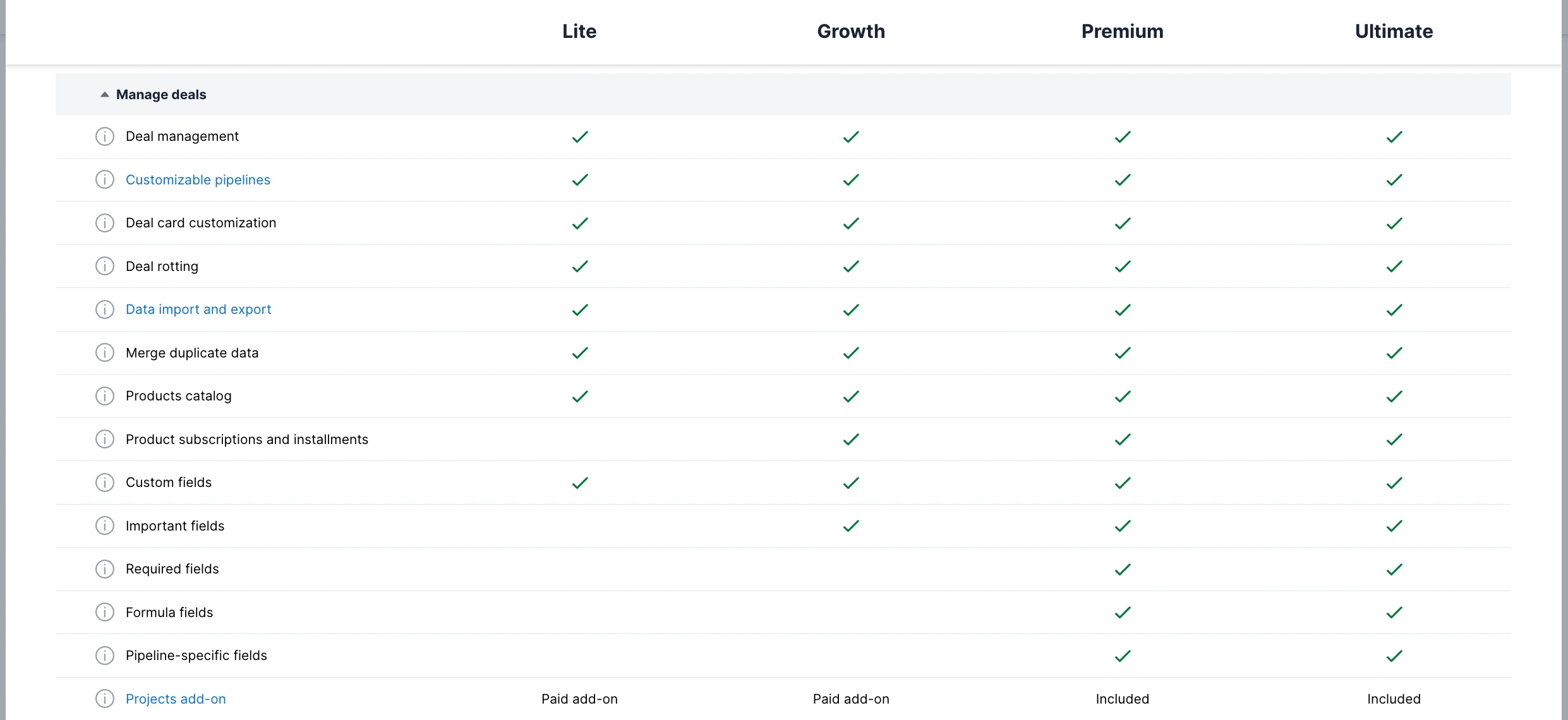
One important note on required fields: this feature — which forces reps to fill in specific information before a deal moves forward — is only available on the Premium plan ($79/seat/month) and above. On Lite and Growth, you can use "Important fields" (Growth+) to highlight key fields, but you cannot enforce them as mandatory before a deal advances. If enforcing data completeness at every stage is critical for your agency, factor that into your plan choice.
Deal rotting is available on all plans. Pipedrive automatically flags deals that have gone untouched past a threshold you define — the deal card changes colour in the pipeline view to signal inactivity. This is one of Pipedrive's most useful data hygiene features and it is free on every tier.
Pipedrive Duplicate Contacts: What the Native Tool Catches
Merge duplicate data is available on all Pipedrive plans, including Lite. Pipedrive duplicate contacts are flagged when you manually add a contact that matches an existing record — the system surfaces the potential match and lets you merge them directly. That is useful when your team is entering contacts one at a time.
The weaker spot is CSV imports. If you import a list of leads from an ad campaign and that list contains Pipedrive duplicate contacts against your existing records, Pipedrive will not automatically catch all of them. For agencies regularly importing ad leads, duplicates can still accumulate over time. A periodic export and external audit using a dedicated CRM cleaner is worth building into your process — see the CRM cleaner & deduplication software roundup → for third-party options that handle bulk Pipedrive duplicate contacts.
Activity and Follow-up Reminders
This is Pipedrive's strongest data hygiene feature, and it is available on every plan. The activity-based selling model means every deal is expected to have a scheduled next activity at all times. When a deal has no activity scheduled, Pipedrive flags it directly in the pipeline view.
The overdue activities dashboard shows exactly which deals are falling behind, by rep and by stage. That visibility alone catches a lot of the slow-moving deals that otherwise quietly expire without anyone noticing. For a small agency where one person might own 30 open deals, this is genuinely valuable.
Compared to HubSpot Free — which shows you activity history but does not proactively surface deals with no scheduled follow-up — Pipedrive's activity model is meaningfully stronger for keeping pipelines clean.
Reporting and Visibility
Pipeline reporting is available on all plans. You can see deal counts by stage, revenue totals, and activity completion rates without upgrading. Subscription and forecast reports require Growth and above — which is one of the more common reasons agencies on Lite eventually upgrade.
CSV export is available on every plan under Data import and export. That means you can always pull your full pipeline data into a spreadsheet, sort by last activity date, and run an external audit even if you are on the cheapest tier. That external audit habit is worth building from day one regardless of which plan you are on.
What Pipedrive CRM Does Well
- Best visual pipeline UI at this price range. The kanban view is clean, fast, and genuinely intuitive. New users are up and running in hours, not days.
- Activity-based selling enforces good follow-up habits. The model of "every deal needs a next activity" prevents deals from going cold without anyone noticing.
- Deal rotting on all plans. Pipedrive automatically flags stale deals in the pipeline view — available even on Lite.
- Merge duplicate data on all plans. Duplicate detection and merging is included from the cheapest tier.
- Fast onboarding — most agencies are set up in a day. No professional services engagement, no complex configuration. You can have your pipeline stages imported and your team trained in an afternoon.
- Clean CSV export for pipeline audits. Pull your full pipeline data on any plan and run your own audit in a spreadsheet. No locked reports, no waiting for an upgrade.
What Pipedrive CRM Does Poorly
- No free plan — every seat costs money from day one. This is the biggest practical barrier for smaller or newer agencies evaluating options.
- Required fields need Premium ($79/seat/month). Enforcing mandatory data entry per pipeline stage — one of the best data hygiene habits — requires the Premium plan. Lite and Growth only offer "Important fields" (highlighted but not enforced) from Growth onwards.
- Email automation requires Growth ($49/seat/month). Automations, nurturing sequences, and full email sync are not included in Lite. If your agency needs email workflows built into the CRM, budget for Growth.
- Reporting is limited on Lite. Forecast and subscription reports require Growth and above. For agencies that need to show pipeline data to clients or leadership, this is a real cost consideration.
- Pipedrive duplicate contacts detection is basic compared to dedicated tools. The built-in merge helps with manual entry, but it does not catch duplicates on CSV imports and does not auto-merge anything. Agencies with large or frequently imported contact lists need a third-party CRM cleaner to manage Pipedrive data hygiene at scale.
- No built-in landing page or form builder. HubSpot includes forms and landing pages on the free plan. Pipedrive does not. If your agency uses these features to capture inbound leads, you will need a separate tool.
Pipedrive CRM vs Alternatives
vs HubSpot: HubSpot has a free plan and better marketing tools; Pipedrive has a better pipeline UI and is easier to learn. If your agency needs email marketing automation or landing pages built into the CRM, HubSpot wins. If you want pure pipeline focus without the marketing overhead, Pipedrive wins. Both are solid — the choice comes down to what your agency actually uses. Read the HubSpot CRM review →
vs GoHighLevel: GoHighLevel is built for agencies managing client CRMs — with white-label sub-accounts and client portals. Pipedrive is for agencies managing their own sales pipeline. These are different use cases. If your agency runs campaigns inside client CRM instances, GoHighLevel is the right tool. If you are managing your own business development pipeline, Pipedrive is designed for exactly that.
vs Close: Close is stronger for high-volume outbound calling, with a built-in power dialer and call workflows that Pipedrive does not match. If your agency runs cold-calling sequences at volume, Close is worth evaluating. If your team's primary workflow is managing inbound pipeline and following up on warm leads, Pipedrive's visual pipeline is a better fit than Close's call-first interface.
Is Pipedrive CRM Worth It for Your Agency?
- If you want a free CRM to start → use HubSpot Free instead
- If you want pure pipeline focus with deal rotting and duplicate merging → Pipedrive Lite ($24/seat/month, or ~$14 annually)
- If you need email sequences, automations, and forecast reports → Pipedrive Growth ($49/seat/month)
- If you need required fields and advanced customisation → Pipedrive Premium ($79/seat/month)
- If you manage client pipelines for multiple clients → look at GoHighLevel
- If your team makes high-volume outbound calls → look at Close
The honest summary: if your agency has budget for at least one paid seat and wants the cleanest pipeline tool available at this price range, Pipedrive is the best option. The activity-based model, deal rotting, and duplicate merging are all available from the Lite plan — making it a strong entry point even at the lowest tier.
If your agency is on a tight budget and cannot justify a per-seat cost from day one, start with HubSpot Free and revisit Pipedrive when you are ready to invest in a dedicated pipeline tool.
How to Get Started With Pipedrive CRM
Step 1: Start your free 14-day trial.
Click here to go to pipedrive.com — no credit card required.
Step 2: Set up your pipeline stages to match your agency's sales process. Before you import anything, map out the stages your deals actually go through. Generic defaults rarely match how a small agency sells. Name the stages to reflect your real process — Lead Qualified, Proposal Sent, In Negotiation, Closed Won.
Step 3: Enable deal rotting thresholds per stage. Set the number of days of inactivity before a deal turns red in the pipeline view. This is available on all plans and is the single fastest way to surface stale deals without any manual effort.
Step 4: Import your existing contacts via CSV. Export your current CRM data, clean it in a spreadsheet, and import it into Pipedrive. Deduplicate before importing — fixing duplicates after the fact takes much longer.
Step 5: Set up activity reminders so no deal goes untouched. Enable the overdue activity view and make it part of your team's daily workflow. Once every rep has a habit of checking their overdue activities each morning, your pipeline hygiene takes care of itself.
Before importing your contacts, export your current CRM data as a CSV and clean it first — you do not want to bring bad data into a fresh pipeline. How to clean your CRM data before migrating →
Frequently Asked Questions
Does Pipedrive detect duplicate contacts? Yes, but with limits. Pipedrive detects and flags Pipedrive duplicate contacts when a record is entered manually — it surfaces a warning before the contact is saved. However, it does not automatically catch duplicates created during CSV imports, which is the most common source of duplicates for growing agencies. For bulk deduplication, you need a dedicated CRM cleaner like Koalify or Insycle.
Is Pipedrive CRM free? No. Pipedrive has no free plan. The cheapest option is Lite at $24/seat/month (billed monthly) or approximately $14/seat/month billed annually. All plans include a 14-day free trial with no credit card required. If you need a free CRM to start, HubSpot Free is the better option.
What is Pipedrive data hygiene like compared to HubSpot? Pipedrive data hygiene is stronger in some areas, weaker in others. Pipedrive wins on deal rotting (flags stale deals automatically on all plans) and activity reminders. HubSpot wins on contact-level duplicate management (Starter+) and data quality scanning (Data Hub). For full database hygiene best practices, both platforms benefit from a third-party CRM cleaner alongside the native tools.
Does Pipedrive have required fields? Required fields — which force reps to fill in specific data before a deal advances — are only available on the Premium plan ($79/seat/month). Lite and Growth have "Important fields" (highlighted but not enforced) from Growth onwards. If enforcing data completeness per pipeline stage is critical for your pipedrive data hygiene, budget for Premium.
How do I remove duplicate contacts in Pipedrive? Go to the contact record → click the three-dot menu → select Merge. For Pipedrive duplicate contacts created via CSV import, export your contact list, deduplicate it in a spreadsheet or CRM cleaner, then re-import the clean version. See the CRM data cleansing guide → for a step-by-step walkthrough.
Ready to Try Pipedrive CRM?
Start your free 14-day trial →No credit card required.
We're building a free audit tool that finds all of these issues in your pipeline in 60 seconds — just upload your CSV.