CRM data hygiene means keeping your contact and deal records accurate, complete, and up to date. If your team is dealing with duplicate contacts piling up, spending hours on manual merges, or chasing leads that went cold three months ago — that's a data hygiene problem. It quietly drains your agency's revenue without anyone noticing until close rates start slipping. The term sounds technical, but the concept is simple: a clean CRM gives your reps a clear picture of what's real, what's worth pursuing, and what needs to be cut.
A Typical Example
Consider a 15-person agency with 2,847 contacts in HubSpot — where 23% are duplicates, 31% have had no activity in 18 months, and 14% are missing email addresses entirely. Their pipeline shows $420,000 in open deals, but only $180,000 is real. That gap does not come from bad selling. It comes from bad data.
When your CRM is dirty, your team wastes time chasing contacts who have already been handled by a colleague, sending emails to addresses that bounce, and reporting on a pipeline that does not reflect reality. CRM data hygiene is the process of fixing that — systematically, not just once.
Why CRM Data Hygiene Matters for Small Agencies
When your pipeline is messy, your close rates suffer. Reps follow up on dead leads, skip over warm ones, and lose track of deals that had real momentum. The problem isn't effort — it's that the CRM is lying to them.
Inaccurate data leads to bad decisions. If your pipeline report shows 40 open deals but half of them are stale or duplicated, your forecast is wrong. You might hire too early, or hold off on outreach when you should be pushing.
Your team also wastes time doing work a healthy CRM would make unnecessary. Manual deduplication, hunting for phone numbers, figuring out who owns a deal — that's time that should go toward actual sales conversations. For a small agency, even two or three hours a week lost to CRM cleanup is meaningful. That's time your best reps could spend closing.
The 5 Signs Your CRM Data Hygiene Is Poor
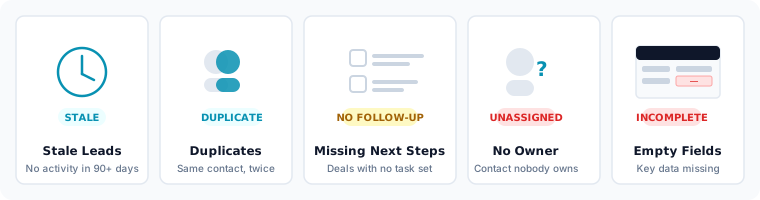
Use this list to audit your CRM right now:
- Stale leads sitting untouched for 14+ days — if no one has touched a lead in two weeks, it needs to be disqualified or reassigned, not left to rot.
- Duplicate contacts for the same company — one contact imported from a form, another added manually by a rep, and now nobody knows which record is current.
- Deals with no next step or follow-up date — a deal without a scheduled action is a deal that will be forgotten.
- No assigned owner on active deals — if a deal doesn't have an owner, no one is accountable for moving it forward.
- Empty fields (no email, no phone, no company) — incomplete records make outreach impossible and reporting unreliable.
If two or more of these describe your CRM today, your pipeline score is lower than it should be.
What is CRM Data Hygiene Worth? Understanding Your Score
Think of your pipeline health as a score from 0 to 100. Here's a rough benchmark:
- 80–100: Healthy pipeline. Your records are complete, leads are being worked, and your data reflects reality. Forecasting is reliable.
- 60–79: Needs attention. Some areas are slipping — stale leads are building up or fields are going unfilled. A weekly audit would stop this from getting worse.
- Below 60: Revenue is leaking. Your reps are working a broken pipeline. Deals are being lost not because of bad selling, but because bad data is getting in the way.
Most small agencies score somewhere in the 50–70 range when they first take a hard look at their CRM. That's not a failure — it's a starting point. Knowing your score tells you exactly where to focus first instead of trying to fix everything at once.
The 4 Areas to Audit
When you're ready to clean up your CRM, focus on these four areas in order:
- Stale leads. Pull every lead that hasn't been touched in 14 or more days. Decide: re-engage, reassign, or disqualify.
- Duplicate contacts. Search for the same email address or company name appearing more than once. Merge or delete the extras.
- Missing next steps. Any open deal without a follow-up date or scheduled task needs one added before the end of the day.
- Data ownership. Every active deal should have a named owner. If it doesn't, assign one now.
These four categories cover the majority of pipeline health issues at small agencies. You don't need a consultant or a custom integration to address them — just a clear process and the discipline to follow it each week. For a step-by-step walkthrough of each area, see the CRM data cleansing guide.
How Often Should You Clean Your CRM?
Run a short audit every week — it takes 15–20 minutes if you make it a habit. Check for new stale leads, deals without next steps, and any contacts added without a complete record. Once a month, go deeper: deduplicate contacts, review ownership across the full pipeline, and check that your deal stages still reflect where things actually stand. A weekly audit prevents the mess from building up. The monthly deep clean catches what slips through.
CRM Data Hygiene Checklist
Use this checklist for your monthly CRM review. A clean CRM takes under 30 minutes a month to maintain once the initial cleanup is done.
- Merge or remove duplicate contacts (target: under 2% duplicate rate)
- Archive or disqualify deals with no activity in 30 or more days
- Close out deals past their expected close date — mark as won, lost, or push the date with a reason
- Verify every open deal has an owner and a scheduled next step
- Set a deal value on all open deals — blank amounts distort your pipeline forecast
- Review contacts marked as Bounced or Unsubscribed and decide whether to delete or archive them
- Fill missing email addresses on active contacts (target: under 5% missing)
- Standardize company name formatting (e.g. "Acme Corp" not "ACME" or "acme corp")
- Reassign deals owned by former team members
- Remove test contacts and internal team members from your main lists
- Set a calendar reminder for next month's hygiene review
Frequently Asked Questions
What is CRM data hygiene? CRM data hygiene is the ongoing practice of keeping your contact and deal records accurate, complete, and up to date. It means regularly removing duplicate contacts, archiving stale leads, filling missing fields, and ensuring every open deal has an owner and a next step. Good CRM data hygiene means your pipeline report reflects reality — not wishful thinking.
What is the difference between CRM data hygiene and CRM data cleansing? CRM data hygiene is the habit; CRM data cleansing is the event. Data cleansing is a structured cleanup of existing bad data — you fix the backlog. Data hygiene is the ongoing discipline that prevents the backlog from building up again. You need both: cleansing resets the baseline, hygiene maintains it.
What is a good CRM data hygiene score? An 80–100 score indicates a healthy pipeline where records are complete, leads are being worked, and forecasting is reliable. A score of 60–79 means attention is needed — stale leads or unfilled fields are building up. Below 60 means revenue is leaking: bad data is actively getting in the way of your reps closing deals. Most small agencies score 50–70 when they first audit their CRM honestly.
How often should you practice CRM data hygiene? Run a light check every week — 15 to 20 minutes is enough to catch new stale leads, deals without next steps, and contacts missing key fields. Once a month, do a deeper pass: deduplicate contacts, review deal ownership across the full pipeline, and check that your deal stages still reflect reality. The weekly habit prevents the monthly deep clean from becoming a crisis.
What are the signs of poor CRM data hygiene? The five most common signs are: stale leads untouched for 14+ days, duplicate contacts for the same company, deals with no next step or follow-up date, active deals with no assigned owner, and contact records missing email addresses. If two or more of these describe your CRM today, your pipeline score is below where it should be.
What tools help with CRM data hygiene? HubSpot and Pipedrive both include native duplicate detection and deal tracking tools. For deeper database hygiene best practices — bulk deduplication, scheduled scans, and data standardisation — dedicated CRM cleaner tools like Koalify (free for HubSpot up to 10k records) and Insycle (from $100/month, multi-CRM) are the most practical options for small agencies.
What is a good CRM data hygiene score? A healthy CRM has under 2% duplicates, under 5% missing email addresses, and under 10% stale contacts (no activity in 12 months). Pipeline Auditor scores your CRM across all three dimensions in 60 seconds — upload a CSV export and get your score instantly.
How long does CRM data cleansing take? A first-time cleanup of a 1,000-contact database typically takes 2–4 hours manually. With a dedicated tool like Koalify or Insycle, the same job takes 20–30 minutes. Ongoing maintenance takes under 30 minutes per month once your data is clean.
We're building a free tool that scores your CRM hygiene in 60 seconds.